


SunnyMelon Newborn Goodies
Smoothing One-Click (with P.S. C.C.)
Smoothing One-Click (with P.S. C.C.)
Couldn't load pickup availability
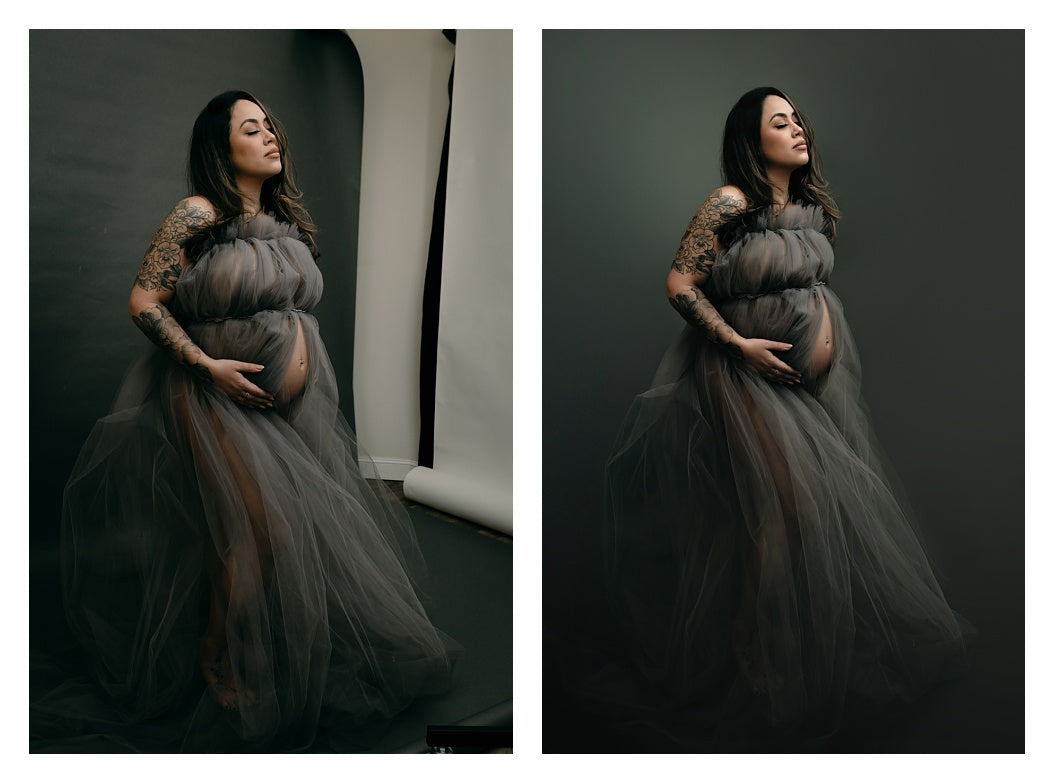
Elevate your editing workflow with the Smoothing One-Click Photoshop Action—your go-to solution for achieving high-end, professional results on studio backdrops and flowing fabrics in seconds.
Whether you’re dealing with wrinkled paper, scuffed floors, or textured dress fabric, this action provides a smooth finish while preserving the natural lighting and depth of your shot.
What’s Included:
- The Smoothing One-Click Action: A powerful, one-click automated tool designed specifically for backdrops and wardrobe.
- Workflow Video Tutorial: Learn the best practices for prepping your image before you hit "Play" and how to fine-tune your image for a flawless, realistic blend.
- BONUS: Original Step-by-Step Guide: We’ve bundled in our classic tutorial video to give you a comprehensive understanding of the smoothing technique from start to finish.
Key Features:
- Pro-Level Results: Eliminate distractions like wrinkles, footprints, and sensor dust without the "plastic" look.
- Total Control: Built-in layers allow you to adjust the opacity and intensity to suit your specific style.
- Time-Saving: Turn minutes of tedious cloning and healing into a few clicks.
Editor’s Note: This isn't just an action; it’s a complete mini-masterclass in background retouching. Perfect for portrait, fashion, and editorial photographers looking to polish their portfolio.
Minimum software requirements:
Photoshop CC 2020 or newer. Check your version (21 or higher) by following instructions here: https://helpx.adobe.com/photoshop/kb/legacy-version-updates.html#...
English UI Language must be installed to run properly
.jpg files for best results; other file types provide mixed results/errors.
Older Photoshop versions buy Smoothing ver.1 https://sunnymelongoodies.com/products/smoothing-ver-1
Please contact our vendor page for support requests https://www.facebook.com/sunnymelongoodies
Do not post questions on how to use the action, screenshots/videos of problems you're having, or anything related to the technical workings of it in the FB group.
Share